
Download WinCalcFree – calculator, currency converter, free calculator app, mobile calculator, math tool, currency exchange, percentage calculator, Android app
Overview
WinCalcFree is a lightweight, free calculator and currency converter application designed for Android users seeking a simple yet functional tool for everyday math and financial calculations. The app serves as a digital replacement for traditional desktop calculators, offering essential arithmetic operations such as addition, subtraction, multiplication, and division. It also supports percentage-based calculations, including discounts, price increases, and tax adjustments, making it suitable for both personal and light business use.
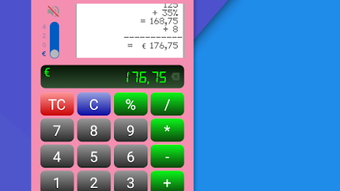
The interface features a paper reel that allows users to review past operations, enhancing transparency and reducing input errors. With its resizable, draggable, and iconizable design, WinCalcFree can be used alongside other apps without disrupting workflow. The app is currently in its first version, indicating a foundational release with potential for future enhancements based on user feedback.
It supports multiple languages, including English, Italian, Spanish, Portuguese, French, German, Russian, Korean, Chinese, and Japanese, broadening its accessibility. While no additional developer background is provided, the app’s focus on simplicity and functionality suggests a targeted approach to usability. It is ideal for users who need quick, reliable access to a calculator and currency converter without the complexity of advanced features.
Key Features & Capabilities
- Basic Arithmetic Operations – Perform standard calculations including addition, subtraction, multiplication, and division with intuitive button layout.
- Percentage Calculations – Easily compute discounts, increases, and tax additions or deductions using built-in percentage functions.
- Resizable and Draggable Interface – Adjust the app window size and move it freely across the screen, allowing multitasking with other applications.
- Minimizable to System Tray – Iconize the app to the notification bar for quick access without full-screen interruption.
- Operation History (Paper Reel) – Review previous calculations via a scrollable paper reel, improving accuracy and workflow transparency.
- Real-Time Currency Converter – Convert between currencies using up-to-date exchange rates, ideal for travelers, freelancers, and international transactions.
- Multi-Language Support – Available in ten languages, including English, Spanish, French, German, Italian, Portuguese, Russian, Korean, Chinese, and Japanese.
These features are particularly useful in real-world scenarios such as calculating daily expenses, managing small business invoices, comparing prices across regions, or preparing travel budgets. The paper reel function helps users verify entries, while the currency converter ensures accurate financial decisions without external tools. The app’s lightweight nature and lack of ads or in-app purchases contribute to a clean, distraction-free experience. Although no advanced functions like scientific calculations or financial modeling are mentioned, the core functionality is well-suited for daily use. The developer encourages user feedback, suggesting an open development process aimed at improving usability in future updates.
User Interface, Workflow & Performance
WinCalcFree presents a clean, minimalist interface that prioritizes usability and speed. The layout mimics a standard desktop calculator, with clearly labeled buttons and a visible display area. Navigation is straightforward, relying on direct tap input with immediate visual feedback.
The app’s ability to be resized and dragged allows users to position it optimally on their screen, enhancing multitasking capabilities. It can be minimized to the system tray, enabling quick access without full-screen interruption. The paper reel feature provides a simple way to scroll through previous operations, improving workflow continuity and reducing the need for manual note-taking.
While specific performance data such as CPU or RAM usage is not provided, the app’s small size (3.4 MB) suggests efficient resource management. The developer did not specify resource usage details, but its lightweight footprint implies minimal impact on device performance. Stability and responsiveness are likely to be consistent, given the app’s focus on core functionality.
No known crashes or performance issues were reported in the release notes. General software behavior patterns suggest smooth operation on modern Android devices. Overall, the workflow is efficient for quick calculations and frequent use.
Compatibility & System Requirements
WinCalcFree is designed for Android devices and is compatible with the Android operating system. The app has a file size of 3.4 MB, indicating a compact footprint that should install quickly on most devices. The developer did not specify exact system requirements, such as minimum Android version or hardware specifications.
Compatibility information was partially provided, with the OS listed as Android and the version noted as 1.0. No details were given about supported screen sizes, processor architecture, or memory thresholds. The app’s lightweight nature suggests it may function on older Android devices, but this has not been confirmed.
Users are advised to ensure their device meets general Android app installation standards. The developer encourages feedback on device performance, which may inform future compatibility improvements. For users seeking a simple, no-frills calculator and currency converter, the app appears accessible across a broad range of Android hardware, though definitive compatibility details remain limited.
Pros and Cons
Pros
- Free to download and use with no ads or in-app purchases
- Lightweight size (3.4 MB) ensures fast installation and minimal storage use
- Resizable and draggable interface supports multitasking
- Real-time currency converter with updated exchange rates
- Supports multiple languages for global accessibility
- Operation history via paper reel enhances accuracy and usability
- Simple, intuitive interface ideal for everyday users
Cons
- Only available for Android, limiting cross-platform use
- No advanced mathematical or scientific functions included
- Exact system requirements not specified
- First version with potential for bugs or missing features
- No warranty provided for data integrity or app performance
- Basic interface may lack customization options
FAQ Section
Is WinCalcFree available for iOS devices?
WinCalcFree is currently only available for Android. There is no official version for iOS at this time.
Does the app require an internet connection?
Yes, the currency converter requires an internet connection to fetch real-time exchange rates. Basic calculator functions can be used offline.
Is the app secure and safe to use?
As a free Android app, WinCalcFree does not include ads or in-app purchases. However, the developer states the app is provided without any warranty, so users should exercise caution when entering sensitive data.
How often are currency exchange rates updated?
The app uses real-time data from external sources, meaning exchange rates are updated as frequently as the service provider allows. The exact update frequency was not specified.
Can I use WinCalcFree offline?
Yes, basic arithmetic operations can be performed without an internet connection. However, the currency converter will not function until a connection is reestablished.
Final Thoughts + CTA
WinCalcFree delivers a focused, no-nonsense experience for users who need a reliable calculator and currency converter on their Android device. Its clean interface, real-time exchange rate integration, and paper reel history feature make it a practical tool for daily calculations, budgeting, and small business tasks. The absence of ads and in-app purchases enhances usability, while multi-language support broadens its appeal.
Although it is in its first version and lacks advanced features, its core functionality is solid and well-executed. The developer’s openness to feedback suggests room for future improvements. For anyone seeking a lightweight, free, and efficient math tool with currency conversion, WinCalcFree is a strong contender.
It is especially suitable for students, travelers, freelancers, and individuals managing personal finances. While not designed for complex scientific or financial modeling, it excels in simplicity and speed. Download WinCalcFree now to streamline your daily calculations and currency conversions on Android.






.png)
